Regulatory context and timeline
| Date | Scope | Obligation |
|---|---|---|
| September 2026 | Large enterprises (GE) | Mandatory reception of e-invoices; emission via approved platform (PA) |
| September 2026 | Mid-sized enterprises (ETI) | Mandatory reception; emission phased in |
| September 2027 | SMEs and micro-enterprises | Mandatory emission and reception |
| Ongoing | All taxable B2B transactions | E-reporting for out-of-scope flows (B2C, international) |
Prepare implementation well in advance of the mandate date. The configuration chain, data quality remediation and PA onboarding require significant lead time.
Separate the regulatory flows
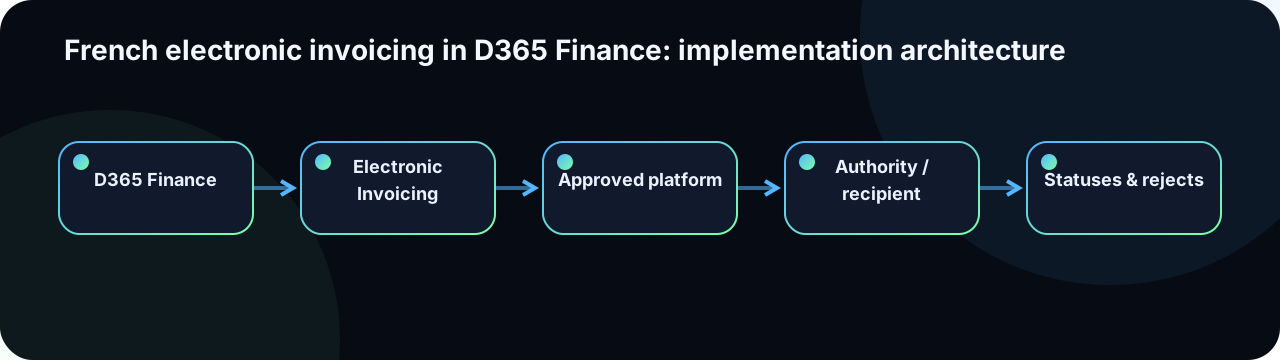
Microsoft documentation distinguishes domestic B2B e-invoicing, inbound supplier invoices and e-reporting for transactions outside mandatory invoice exchange. The D365 approach uses an Approved Platform (PA) and the cloud Electronic Invoicing service.
Start with Electronic invoicing for France and France e-reporting.
| Flow | Examples | Processing |
|---|---|---|
| Outbound e-invoice | Domestic B2B invoice and credit note | Generate, validate, submit to PA, receive statuses |
| Inbound e-invoice | Supplier invoice | Receive from PA, map to vendor invoice, match and approve |
| E-reporting | B2C, international and relevant payment data | Collect, transform and transmit periodically to DGFiP via PA |
| B2G | Public-sector invoices (Chorus Pro) | Specific routing via Chorus Pro; separate configuration |
Technical components and data flow
- D365 Finance: documents, parties, taxes, establishments, identifiers and business status management.
- Globalization Studio: import, configure and publish globalization features (including the French feature).
- Electronic Reporting (ER): transform business data into required formats (Factur-X, UBL, EN16931).
- Electronic Invoicing service: execute configurable processing scenarios outside the Finance runtime.
- Azure Key Vault: protect certificates, API keys and PA connection material.
- Approved Platform (PA): provide regulatory last-mile connectivity, status propagation and DGFiP reporting.
See Electronic invoicing service overview and Electronic invoicing components.
Electronic Reporting configuration hierarchy
The ER framework delivers invoice format through a strict parent-child inheritance model. Customizing or extending the standard formats requires understanding this hierarchy to avoid breaking Microsoft's update path:
ER Configuration hierarchy (example for France):
Invoice model (abstract)
└── Invoice model mapping (data transformation)
    └── French electronic invoice (FR) [globalization feature]
        ├── Factur-X / UBL 2.1 format
        │   └── [Customer-derived format — extend here, not at parent]
└── E-reporting format- Always create a derived format for any customisation. Never modify the Microsoft-provided configuration directly.
- Set the derived format's base to the Microsoft version you have tested. When Microsoft releases an update, compare the delta before rebasing.
- Store ER configurations in a dedicated Azure Blob storage or the Dataverse-connected repository, not on the developer machine.
- Version-control the exported ER XML files alongside the X++ source code.
Data quality is the critical path
- SIREN/SIRET, VAT identifier (TVAIFR) and Registration categories for each party.
- Electronic invoicing address (PEPPOL-style identifier) and PA routing identifier.
- Issuing establishment, address and applicable registration identifiers.
- Customer/vendor country, relationship type (B2B, B2C, public sector) and PA routing code.
- Tax codes, exemption reasons, units of measure and payment terms.
- Mandatory references: purchase order, contract, service, buyer reference (BT-10).
Run a data quality assessment against all active customers and vendors before configuration. A missing SIRET or incorrect routing identifier will cause the invoice to be rejected by the PA with a regulatory non-compliance error that requires correction and resubmission.
Configuration chain
- Install and activate Electronic Invoicing for an eligible cloud environment (Tier 2+).
- Configure Key Vault and PA credentials (certificate for digital signature, API key for PA connectivity).
- Import the French electronic invoice (FR) globalization feature from the Global repository.
- Associate ER configurations, processing scenarios, communication channels and response-type mappings.
- Configure establishments, Registration IDs and applicability conditions (legal entity, document type).
- Schedule submission and status-polling batch jobs; configure monitoring alerts.
- Test every document type and every expected status transition before go-live.
Design an operable state machine
DRAFT
  → POSTED (accounting posted in D365)
    → READY_TO_SUBMIT (batch picks up)
      → SUBMITTED (sent to EI Service)
        → SUBMITTED_TO_PA (forwarded to Approved Platform)
          → DELIVERED (PA confirmed delivery to buyer)
            → ACCEPTED (buyer accepted)
            → REJECTED → CORRECTION_REQUIRED → RESUBMITTED
          → PA_ERROR (transient — retry queue)
        → EI_SERVICE_ERROR (config or format error — manual action)
Every status transition requires: a timestamp, the source (D365, EI Service, PA or buyer), the external identifier (PA document ID, DGFiP reference) and an actionable message for business users.
- Do not confuse D365 accounting posting with regulatory submission status.
- Correlate the D365 document number, the EI Service message ID and the PA identifier in a single lookup table.
- Separate transient technical failures (network, expired secret) from business rejections (invalid data, duplicate).
- Define who can retry, correct and cancel: business user, accountant or IT only.
Resilience and security
- Use a stable unique correlation key per document (document number + legal entity + sequence) and design for idempotent resubmission.
- Exponential retry with a cap and dead-letter queue for transient failures only.
- Manual recovery queue with clear owner assignment for business rejections.
- Planned Key Vault secret and PA certificate rotation (before expiry, not at expiry).
- Logging that records the correlation ID and status but does not expose invoice body content in application logs.
- Alerting for documents stalled beyond a configurable threshold (e.g., 48 hours in SUBMITTED state).
Test matrix
| Axis | Test cases |
|---|---|
| Documents | Invoice, full credit note, partial credit note, prepayment invoice, project invoice, free-text invoice |
| Parties | French B2B (SIREN known), French B2B (SIREN missing), B2C, international customer, public sector (Chorus Pro), sub-contractor |
| Tax | Standard 20%, reduced 10%/5.5%, exempt (with code), reverse charge, rounding variants |
| Lifecycle | Accept path, rejection + correction + resubmit, cancellation (credit note), duplicate detection |
| Technical | PA timeout, expired certificate, invalid XML response, batch restart mid-run, Key Vault unavailable |
| E-reporting | B2C sales period, international sales, payment data, reconciliation with accounting period close |
| Volume | Month-end peak batch, parallel processing, PA response queue throughput |
Operating runbook
- Daily dashboard: documents by status, age and legal entity.
- Diagnosis workflow by correlation identifier (D365 number → EI Service ID → PA reference).
- Named business and IT owner for every rejection-type category.
- Planned certificate and secret rotation calendar (PA API key, signing certificate).
- PA outage recovery process: hold queue, batch suspension, stakeholder communication.
- Daily volume and accounting reconciliation (invoiced amount vs. posted vs. transmitted).
- Monitoring of Microsoft regulatory feature updates and DGFiP format specification changes.